

Website Backup Strategy for Irish Small Businesses

A good website backup strategy is a written routine that answers four questions: what you copy, how often, where the copies live and how you know they restore. The copy must sit somewhere that a hacked hosting login, a bad update or a failed server cannot reach. If your site is how customers find and contact you, that routine is part of running the business, not an IT extra. Our Website Care plan covers managed hosting and technical care for Irish small businesses at €29 per month, so the routine below is one we build around.
TL;DR
- Back up three things, not one: the site files, the database (your page text, enquiries and settings) and the uploads folder with your photos. Add your domain’s DNS records and business email.
- Follow the 3-2-1 rule: three copies, on two types of storage, with one copy off-site and out of reach of your hosting login.
- Match frequency to how often the site changes, and keep older copies for weeks and months, because damage can go unnoticed for a long time.
- A backup you have never restored is a guess. Test a restore regularly and write down the date.
- Your host’s automatic snapshot is one copy, not a whole plan.
Table of Contents
- What a website backup actually has to contain
- Why a small business needs a plan, not just a host
- The 3-2-1 rule, explained for a small site
- How often to back up, and how long to keep copies
- Where to store your backups
- Test the restore, because that is the only proof
- Setting up your own backup strategy in five steps
- Backups when you change platform or redesign
- Where Website Care fits
- Our view on website backups
- FAQ
- Sources
What a website backup actually has to contain
Most small business sites are a mix of three parts. Understanding them is the first step, because people often copy one part and discover the others missing on the worst day.
The files. These are the theme or design, plugins, code and configuration that make the site look and behave as it does.
The database. This is where the words on your pages, your service descriptions, form submissions and settings are stored. Copy the files without the database and you get an empty shell.
The uploads folder. Your photos, logos, PDFs and gallery images. It is the part most often forgotten, and the first thing a customer notices missing.
Beyond the site itself, there are two things that quietly cause long outages:
- DNS records. These are the settings at your domain registrar that tell the internet where your website and email live. Export or screenshot them once a year, and again after any change.
- Business email. Quotes, agreements and customer correspondence often exist only in one mailbox. If your email is tied to your domain, it belongs in the plan.
The IDCARE web security fact sheet for small businesses recommends automating regular backups, storing them separately from the live site and off-site in cloud storage, and taking a backup before you make changes to the site. That last point is the cheapest habit on this list: one fresh copy before any update means a bad update is a ten-minute problem.
Why a small business needs a plan, not just a host
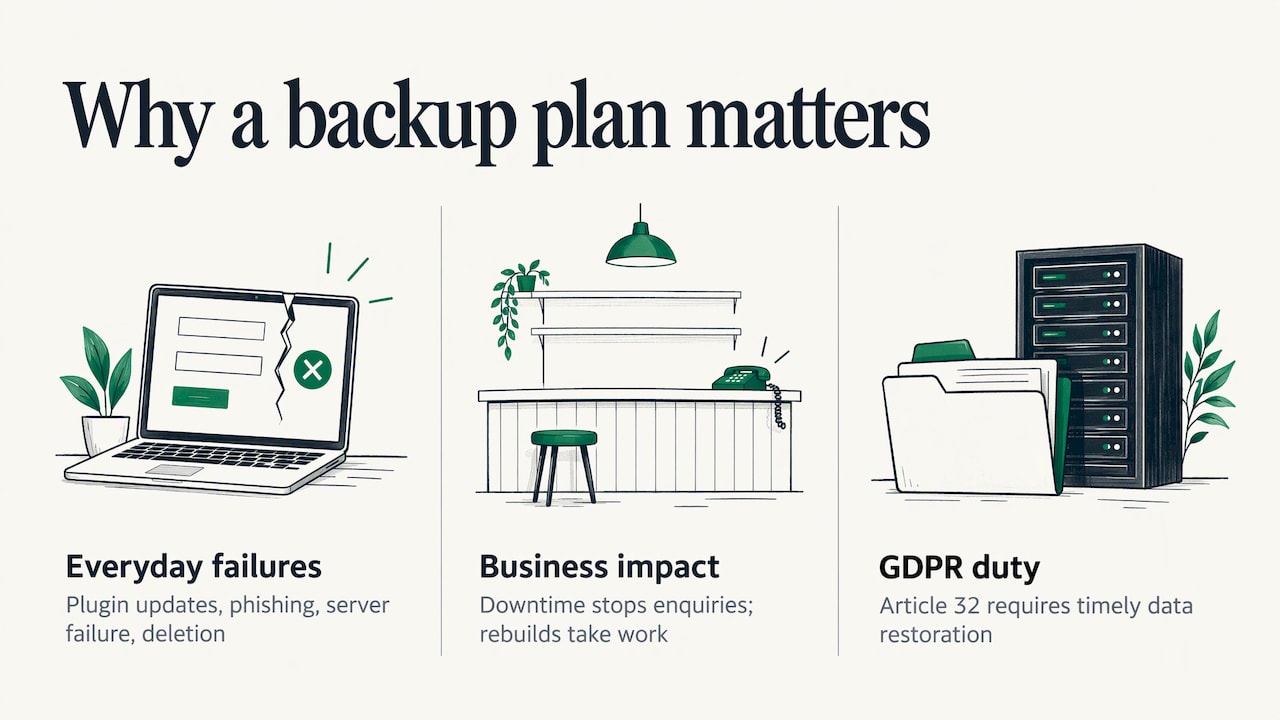
The reasons are ordinary. A plugin update breaks the contact form. A password is phished. A hosting server fails. Someone deletes the wrong page. Ransomware, malicious software that locks or destroys your data, is the dramatic case, but the everyday ones cost more over a year.
For a sole trader or tradesperson the cost is concrete: if the site is down or gone, enquiries stop. A rebuild from scratch means rewriting content, re-sourcing images and re-doing the Google settings you worked for. Our piece on why website uptime matters for Irish small businesses covers the enquiry side of this.
There is also a legal angle. Article 32(1)© of the GDPR requires organisations to be able to restore the availability of and access to personal data in a timely manner after a physical or technical incident. If your site stores enquiry forms, booking details or customer accounts, you hold personal data, so the ability to restore it is part of your obligations. The same Article also asks for a process to regularly test and evaluate your security measures, which is why testing is a core step below, not an extra.
The 3-2-1 rule, explained for a small site
The standard rule of thumb is 3-2-1. The EDPB, the body of EU data protection authorities, cites the 3-2-1 method in its breach guidelines and says backup procedures should be structured, consistent and repeatable.
- 3 copies: the live site plus two backups.
- 2 types of storage: for example your hosting account and a separate cloud storage account, or a cloud account and an external drive.
- 1 copy off-site: physically and logically away from your host.
For a typical five-to-fifteen-page business site, a workable version looks like this:
| Copy | Where it lives | What it protects against |
|---|---|---|
| Live site | Your hosting | Nothing, it is the original |
| Automatic backup | Your host’s backup system | Quick fixes, bad updates, accidental deletion |
| Off-site copy | Separate cloud storage with its own login | Host failure, hacked hosting account, deleted backups |
The key phrase is “its own login”. The Irish National Cyber Security Centre (NCSC) says in its cyber security guidance for small business that backups should be kept separate from the original, ideally air-gapped, meaning disconnected from the network. It also warns that attackers who get access may tamper with backups. If one password opens your site and every copy of it, you have one copy with extra steps.
The EDPB adds that medium- and long-term backup media should be kept separate from operational storage and out of reach of third parties, even after a successful attack. For a small site, a copy in a different account, protected by a different password and two-factor login, meets the spirit of that.
How often to back up, and how long to keep copies
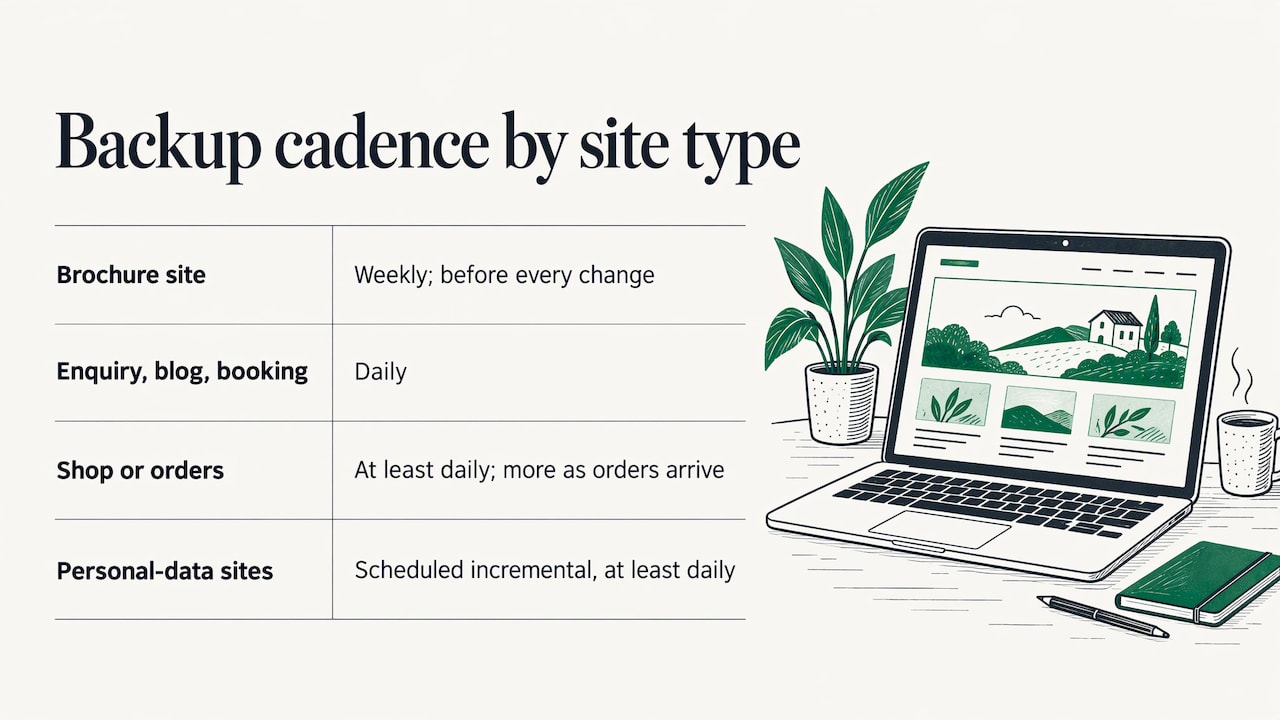
The NCSC’s advice is that backups should be scheduled according to how often the data changes. That gives you a simple way to decide.
A brochure-style site that you edit a few times a year: a weekly backup is usually enough, plus one before every change.
A site with an enquiry form, blog or booking system: daily. Ask how many days of form enquiries you could afford to lose or retype. That number is your backup interval.
A shop or anything taking orders: daily at the very least, and more often if orders arrive through the day. ENISA, the EU cybersecurity agency, recommends scheduled incremental backups at least daily for sites handling personal data. An incremental backup copies only what has changed since the last one, so it is quick and light.
Keep older copies too
Frequency is only half of it. Problems such as spam pages, injected code or a slowly corrupting database can sit unnoticed for weeks. If you keep only the last three days, every copy you have may already contain the damage.
A sensible retention ladder for a small business site:
- Daily copies for the last two weeks.
- Weekly copies for the last two months.
- One monthly copy for the last year.
GDPR also expects you not to hold personal data longer than you need to. Keeping a year of monthly copies is a defensible, documented choice for most small sites. Keeping everything forever is not, so write down your retention period.
Where to store your backups
Choose storage you can name and control. Three practical options for a small business:
- A cloud storage account separate from your hosting. The most practical off-site copy for most owners. Use a strong, unique password and two-factor authentication.
- An external drive kept offline. Plugged in only to take the copy, then unplugged. It cannot be encrypted or deleted by an attacker online.
- Your host’s backup system. Useful and convenient, but only one leg of the plan.
Two cautions apply. First, file-sync tools that mirror your folders to the cloud are not backups: if a file is deleted or damaged, the damage syncs too. Second, if you hold personal data, check which country your storage is in. A company with an Irish office does not necessarily store your data in Ireland, and EU data protection rules apply to where personal data goes. Encrypt copies before they leave your control, as ENISA recommends for third-party backup copies.
Host snapshots versus real backups
Many hosts take a nightly snapshot, a point-in-time image of the whole server. Snapshots are excellent for fast rollbacks after a failed update. They usually live on the same infrastructure as the site, so they share its fate if the account is compromised or the server fails. There is a clear explanation of snapshot versus backup differences if you want the technical detail. The takeaway for a business owner: use the snapshot for speed, and keep a separate copy for survival.
Test the restore, because that is the only proof
A backup file proves only that a file exists. What matters is whether your site comes back from it. Do this test properly at least once a quarter, and after any major change:
- Restore the latest backup to a separate test location, never over your live site.
- Open the home page and click through the main service pages.
- Check that a page of written text loads, which confirms the database came back.
- Check that photos display, which confirms the uploads folder came back.
- Submit the contact form and confirm the enquiry reaches you.
- Note the date, what you restored and how long it took.
That dated note is useful twice. It tells you how long you would be offline in a real incident, and it is the plainest evidence that you can restore personal data and regularly test your safeguards, which Article 32 asks of you.
If you want a broader routine to sit alongside this, our website maintenance checklist covers five checks you can do in 45 minutes.
Setting up your own backup strategy in five steps
- List what you have. Site files, database, uploads, domain and DNS records, business email, and any third-party tools that hold customer data.
- Set two targets. How much recent work you can afford to lose (this sets backup frequency) and how long you can afford to be offline (this sets how fast the restore must be).
- Automate. Use your host’s backup service or a reliable tool so nothing depends on you remembering.
- Add the off-site copy. A separate account with separate credentials, plus an offline copy if you can.
- Test and write it down. Put a quarterly restore test in your calendar and keep one page that records where each backup lives and who can access it.
That page matters more than it sounds. If you are ill or on site for a week, someone else needs to know where to look. Do not store the passwords in the same document as the instructions.
Backups when you change platform or redesign
The riskiest moment for any website is a rebuild or a move to a new host. Take a full backup first, keep it untouched until the new site has run cleanly for a few weeks, and confirm that redirects, forms and email still work. Our guide to website platform migration for small businesses walks through the plan, and if you are rebuilding an outdated site, our website redesign and rebuild service is the place to start.
Where Website Care fits
A backup routine is the sort of job that is easy to agree with and easy to let slip. If you would rather have it handled as part of the site than carry it yourself, our Website Care plan is €29 per month and covers managed hosting and technical website care. Business Growth Care is €49 per month, and Website Care + SEO Growth is €99 per month. You can see what monthly care includes on our website care plans page, and the websites themselves start at €499 one-off for the Launch Website.

If you are starting from nothing, our website design for new businesses page shows how a first site is set up, with you dealing directly with the person who builds it.
Our view on website backups
We build sites for people who have a business to run, not a server to look after. Most of the owners we meet have never asked where their website’s copy lives, and that is a fair thing not to know. It is also the question that matters on the day something breaks.
Our view is simple: a website is a business asset, and the hosting, the technical upkeep and the routine around it should be looked after by someone, every month, not only when there is a crisis. That is why our sites come with a monthly care plan for managed hosting and technical care, with prices published, so you know what you pay.
The best protection is a plan you can describe in one paragraph: what is copied, where it goes, who can reach it and when it was last restored. If you can say that, you are ahead of most small firms. If you would like the site and the care built with that mindset from the start, talk to us and you will deal directly with the person doing the work.
niall
FAQ
How do I back up a website if I am not technical?
Start with whatever automatic backup your hosting offers, and switch it on. Then add a second copy in a separate cloud account and save a fresh copy before every change. If this sounds like a chore, it is exactly the sort of task a website care plan is for.
What does the 3-2-1 backup rule mean?
Keep three copies of your data, on two different types of storage, with one copy off-site. The EDPB cites it in its data breach guidelines. For a website, that is the live site, a host backup and a separate cloud or offline copy.
How often should I back up my website?
Match it to how often the site changes, as the NCSC advises. A static brochure site can manage weekly backups, while a site with forms, a blog or orders should be backed up daily. Always take one before updates or redesign work.
Do I need to test my backups?
Yes. Restoring to a test location and checking that pages, photos and forms work is the only way to know the backup is usable. If your site holds personal data, a dated record of that test also supports your GDPR obligations.
Sources
- NCSC: Cyber security for small business (PDF)
- GDPR, Regulation (EU) 2016/679, on EUR-Lex
- EDPB Guidelines 01/2021 on data breach notification examples
- ENISA: Guidelines for SMEs on the security of personal data processing
- IDCARE: Web security for small businesses
- Snapshot versus backup for VPS