

Email Deliverability Basics for Irish Small Businesses

Email deliverability is whether your message reaches the recipient’s inbox instead of the spam folder or being rejected. For a small business, it mostly comes down to three DNS records on your domain (SPF, DKIM and DMARC), a sensible sending pattern and a domain and email setup done properly at the start. Get those right once and quotes, invoices and enquiry replies stop disappearing.
This guide is for owners who have a domain and business email, or are about to get one, and want to know why messages go missing and what to do about it. You don’t need to be technical. Each term is explained where it first appears.
TL;DR
- Delivered is not the same as in the inbox. A message can be accepted by the receiving server and still be filed as junk.
- Mailbox providers check three DNS records on your domain (SPF, DKIM, DMARC) before they judge a word of your content.
- Fix authentication first, then blocklists and sender reputation, and only then wording.
- Every service that sends as your domain (booking system, invoicing tool, website form, newsletter) needs to be covered by those records.
- Set up your domain and email properly when the website is built, and the problem rarely appears.
Table of Contents
- What email deliverability actually means
- Why your emails are going to spam
- SPF, DKIM and DMARC in plain English
- The rules the big mailbox providers now enforce
- The DNS records you need, and what they look like
- Setting up SPF, DKIM and DMARC in the right order
- If the records are right and mail still goes to junk
- Website forms and email: a common blind spot
- Why the domain and email setup should come first
- Getting it handled for you
- FAQ
- Sources
What email deliverability actually means
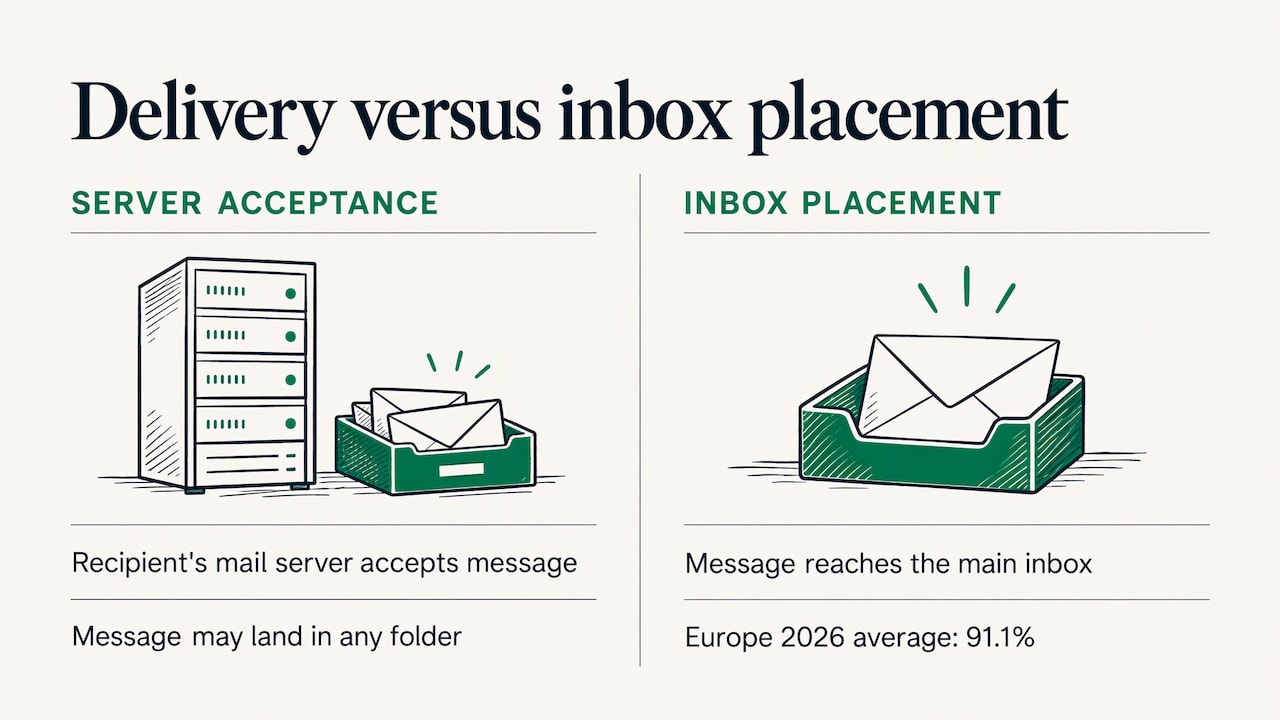
There are two different things people call “delivery”. The first is that the recipient’s mail server accepted your message. The second is that it landed in the main inbox. Brevo’s help documentation separates the two: deliverability is about reaching the inbox, not just being accepted into a mailbox in any folder.
The gap is bigger than most owners expect. Validity’s 2026 benchmark report found Europe was the best-performing region, with an average inbox placement rate of 91.1%. That is a good average, and it still means roughly one message in eleven does not reach the inbox. The same report puts the 2026 expectation for spam complaint rates under 0.1%.
For a tradesperson sending a quote or a clinic sending an appointment confirmation, one missed message is a lost job or a no-show. That is why this is worth an afternoon.
Why your emails are going to spam
In most small business cases the cause is not your wording. Before a receiving service reads your message, it checks whether the domain in your From address can prove the mail really came from you. Failing that check is the most common reason a perfectly ordinary email lands in junk.
The second group of causes is behaviour: sending to an old list, sudden jumps in volume, or recipients marking your mail as spam. The third is shared infrastructure. If your website’s mail goes out through a crowded server that has been blocklisted, you inherit that bad name.
Spamhaus, which runs widely used blocklists, explains in its sender guidelines that reputation is built from several signals: the provider you use, the neighbourhood of the IP address, the history of the domain and how it has been used. A strong negative signal can outweigh the lack of positive ones. A brand-new domain has no history, so it starts cautiously.
A five-minute check before you change anything
Work out what is actually happening first:
- Ask a customer which email service they use, and whether your message went to junk or never arrived at all. Junk means it was accepted and judged. Never arrived usually means it was rejected, and the bounce message you receive back often says why. Keep it.
- Send a test to a personal Gmail or Outlook account that you control. If it lands in junk there too, the problem is on your side.
- In Gmail, open the message and choose Show original. Look for three lines: SPF, DKIM and DMARC, each saying pass. The DKIM line should show your own domain, not an unrelated service’s domain.
If any of those say fail or none, you have found your problem.
SPF, DKIM and DMARC in plain English
Think of the three records as three ways of proving that an email really belongs to your business.
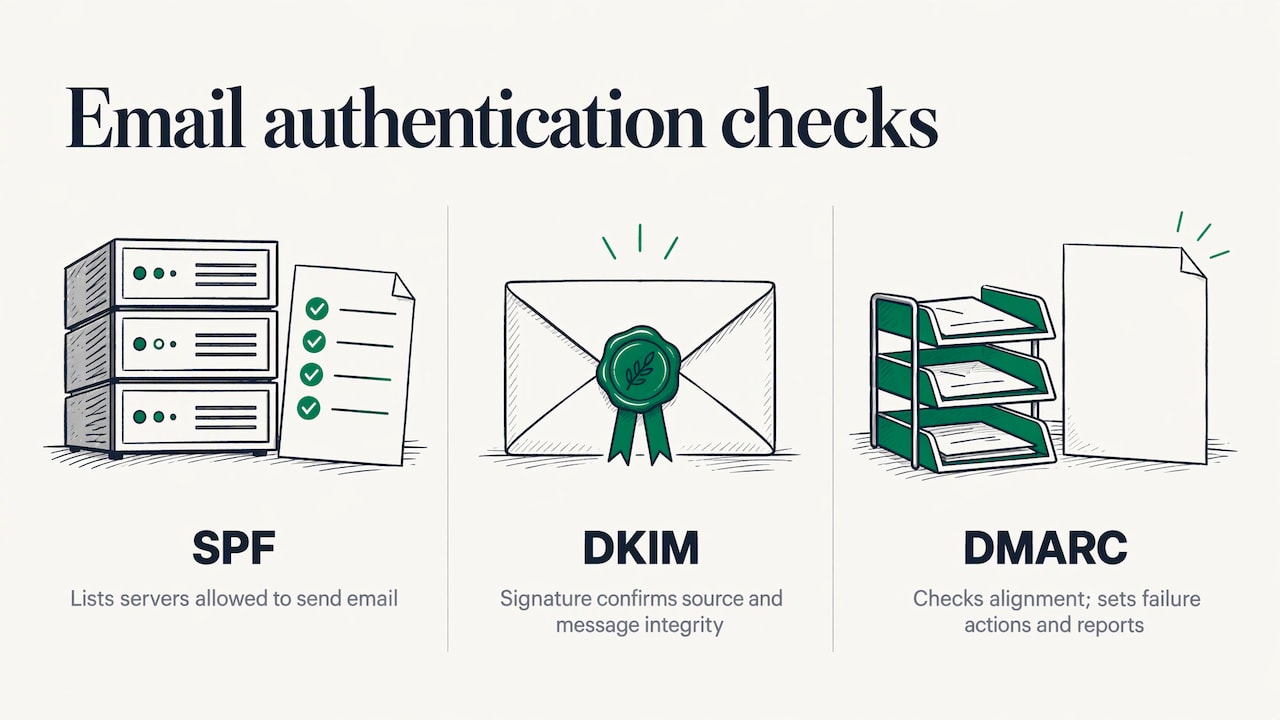
SPF (Sender Policy Framework) is a list published in your domain’s DNS, the public settings that tell the internet how your domain works. It names the servers allowed to send email for you. The receiving server checks whether the sending server is on the list.
DKIM (DomainKeys Identified Mail) adds a digital signature to every outgoing message. You publish a public key in DNS, and the receiver uses it to confirm the message came from you and was not altered on the way.
DMARC sits on top of the other two. It says that a message only counts as genuine if SPF or DKIM passed for a domain that matches the one in your visible From address. It also lets you tell receivers what to do with failures (nothing, send to junk, or reject) and where to send you reports.
M3AAWG, the industry body for messaging and anti-abuse practice, states in its Sender Best Common Practices that to meet major mailbox provider requirements, senders need an SPF record, DKIM-signed mail, a DMARC policy on the visible From domain and alignment between them. In short, all three, working together.
Why “alignment” trips people up
A message can pass SPF and DKIM and still fail DMARC. This happens when a third-party service signs the mail with its own domain rather than yours. The check passes, but for the wrong name. When you set up any sending service, look for the option to authenticate your own domain, not just to start sending.
The rules the big mailbox providers now enforce
Google’s email sender guidelines have applied since February 2024. Every sender to Gmail needs SPF or DKIM, valid forward and reverse DNS records for the sending server, a TLS (encrypted) connection, and a spam rate kept low in Google Postmaster Tools. Google recommends staying below 0.10% and never reaching 0.30%. Anyone sending more than 5,000 messages a day to Gmail must also publish DMARC and offer one-click unsubscribe on marketing mail.
Most Irish small businesses are far below 5,000 a day, but the direction is clear: authentication is the baseline, and sending as a domain with no records is the exception that gets punished. Google also notes that a high spam rate leads to more mail being classed as spam, and that recovery takes time.
The DNS records you need, and what they look like
You will publish these at wherever your domain’s DNS is managed, which is usually your domain registrar or hosting provider. If you are unsure of the difference between the two, our guide to domain versus hosting explains it.
| Record | Where it lives | What it does |
|---|---|---|
| MX | Domain root | Tells the world where to deliver mail sent to you. It governs receiving, not authentication. |
| SPF | TXT record at the domain root, starting v=spf1 | Lists the servers allowed to send as you. |
| DKIM | TXT record at selector._domainkey.yourdomain | Publishes the key that verifies your signatures. Your email provider generates it. |
| DMARC | TXT record at _dmarc.yourdomain | Sets the policy for failures and the address for reports. |
The exact values come from your email provider. For example, a domain that sends only through Google Workspace uses an SPF record that includes Google’s sending servers, and a Microsoft 365 domain uses Microsoft’s. Copy the values from your provider’s own setup page rather than from a blog.
Three mistakes that cause most SPF failures
- No SPF record at all. Common on domains registered years ago and forgotten.
- Two SPF records. A domain must have exactly one. Two cause a permanent error under the SPF standard, so the check fails. When you add a new service, add it to the existing record rather than creating another.
- A service missing from the record. You add a booking system, an invoicing tool or a newsletter platform later, and nobody updates the list.
SPF is also limited to ten DNS lookups, and each include counts. If you stack up many services, you can hit that limit without noticing.
Setting up SPF, DKIM and DMARC in the right order
- List every service that sends email as your domain. Your mailbox provider, your website contact form, your invoicing or accounting software, your booking system, your newsletter tool. This list is what most people skip, and it is where most problems start.
- Publish one SPF record that includes all of them.
- Switch on DKIM in each service’s settings and publish the key it gives you. Each service needs its own.
- Add DMARC, starting in monitoring mode. A typical first record is a DMARC TXT record at _dmarc with the policy p=none and a reporting address that you read. Monitoring mode changes nothing about delivery while you learn who is sending as you.
- Review the reports for a few weeks, fix any genuine sender that fails, then move to quarantine and eventually reject. A strict policy applied before every real sender is authenticated can cause your own invoices and booking confirmations to be rejected. Equally, staying at monitoring forever protects nobody from someone spoofing your name.
- Test with a real message. Send to a Gmail account you control, open Show original and confirm spf=pass, dkim=pass with your own domain, and dmarc=pass.
If you use Google, Postmaster Tools is free and shows the spam rate and reputation Gmail sees for your domain once you verify it.
The records themselves usually take well under an hour. Rebuilding a damaged reputation takes weeks of consistent, wanted email, which is why doing it before you start sending matters.
If the records are right and mail still goes to junk
Work through these in order:
- Check blocklists. Spamhaus offers a free lookup for the lists receivers use most. A listing is a clue, not a full diagnosis: check your domain, sending IP and any link domains separately.
- Check where your mail is sent from. If your website sends mail from the same shared server as hundreds of other sites, one bad neighbour can drag everyone down. Spamhaus also expects each sending IP to have matching reverse DNS, and says missing or mismatched records are one of the most common reasons for listing.
- Look at your list and volume. Old addresses produce bounces, and sudden jumps in volume look suspicious. If you have a new domain, build up volume gradually. M3AAWG suggests treating around six weeks as an average warm-up period for a new domain, spreading each day’s mail out rather than sending it in one burst.
- Separate your mail types. Spamhaus recommends using different subdomains for different mail streams, such as transactional mail (receipts, confirmations) and marketing, so each builds its own reputation.
- Only then, look at wording. A word change does not fix a DNS or reputation problem.
Website forms and email: a common blind spot
Many small business sites send contact form notifications through the website’s own server as if they came from your domain. If SPF and DKIM do not cover that route, the notification can land in junk or vanish, and you never see the enquiry. It is one reason a site can look fine while enquiries quietly go missing. Our guides on setting up business email so it stops landing in spam and on contact form best practices cover the practical side.
Why the domain and email setup should come first
A new business has an advantage here. You can set up the domain, the mailboxes and the authentication records before sending anything, so your first emails start with a clean record rather than a repair job. A domain you choose carefully, set up with proper email and keep on tidy hosting gives you a stable base. If you are still picking a name, see how to choose a domain name for your Irish business.
Our view
When a new client comes to us, the website is usually what they have in mind. The email is what they forget, until a customer says they never got the quote.
We build the website, the domain and the business email as one job. Domain and business email setup is part of what we do, alongside managed hosting and ongoing website care, so the pieces that send mail as your business are not left to chance. You also deal directly with the person building your site, which means the question “what else sends email as my domain?” gets asked and answered at the start.
Our approach is plain: fixed quotes, no jargon, and a site that exists to bring in enquiries. An enquiry that lands in junk does not do that, so we treat email as part of the website, not an afterthought.
niall
Getting it handled for you
If you would rather not edit DNS records yourself, we set up your domain and business email as part of a new site. Our Launch Website is €499 one-off, the Business Website is €799 one-off, and the Growth Website is from €1,295 one-off. Ongoing website care starts at €29 per month and covers hosting and technical care, so the foundations stay in order as your business adds new tools. You can see everything on our services page.

Already have a site that is losing enquiries or looks dated? A website redesign and rebuild is the natural moment to put the domain and email on a proper footing.
FAQ
What is a good email deliverability rate?
There is no single official figure. Validity’s 2026 report found an average inbox placement of 91.1% in Europe, and many healthy senders aim for 90% or more. Keep spam complaints under 0.1% and bounces low, and you are in good shape.
Do I need SPF, DKIM and DMARC if I only send a few emails a day?
Yes. Google’s strictest rules apply above 5,000 messages a day, but all senders to Gmail need SPF or DKIM, and unauthenticated mail from a business domain is more likely to be treated as suspicious at any volume. Setting up all three is a one-off job that protects your name as well.
How long does it take to fix emails going to spam?
The DNS records themselves are usually quick to publish, and changes can take a short time to spread. Reputation takes longer. Spamhaus notes that reputation builds from history, so expect weeks of consistent, wanted email before things settle.
Should I set DMARC straight to reject?
Not at first. Start in monitoring mode, review the reports, make sure every genuine sender passes, and then tighten the policy step by step. Going straight to reject can block your own legitimate mail.
Can I fix this by changing the wording of my emails?
Rarely. Wording matters for marketing mail, but if your authentication records are missing or wrong, no rewrite will rescue the message. Fix the records first.
Sources
- Brevo: What is email deliverability?
- Validity: 2026 Email Deliverability Benchmark Report
- Spamhaus: Sender Guidelines
- Google: Email sender guidelines
- M3AAWG: Sender Best Common Practices