

CMS vs Static Website: Which Suits a Small Irish Business?

A static website is a set of finished pages that are served exactly as stored. A CMS (content management system) website builds each page from a database and lets you edit it through a login. For most Irish small businesses, the better question is not which technology sounds better, but who will keep the site updated, secure and working once it is live. That is why we build and look after the site for you, so the platform is never your problem.
This guide explains both types in plain English, compares them on the things a sole trader or small firm actually cares about, and shows how to decide.
TL;DR
- A static site is stored as finished pages. A CMS site assembles pages from a database each time someone visits.
- A CMS suits businesses that change content often and want to edit it themselves. A static site suits a small set of pages that rarely change.
- Either type needs hosting, a domain and someone responsible for keeping it safe and running.
- Speed depends more on how the site is built and how big the images are than on the label CMS or static.
- Starting from €499 one-off, with care from €29 a month, we handle the build, hosting and technical upkeep so you can run your business.
Table of Contents
- What is the difference in plain English?
- CMS vs static: the comparison that matters to a small business
- Editing: who changes the content, and how often?
- Speed: it depends on the build, not the label
- Security and upkeep: the part most owners underestimate
- Cost: build price and the running bill
- So which one should you choose?
- What we think
- Get a site that is built and looked after for you
- FAQ
- Sources
What is the difference in plain English?
Think of a printed menu against a menu that a kitchen writes fresh for each table.
A static website is the printed menu. Every page exists as a complete file on the server. When someone visits, the server hands over that file unchanged. Nothing is assembled and there is no database behind it. To change a price or a phone number, someone edits the page and publishes it again.
A CMS website is the fresh menu. WordPress is the best-known example. Its own documentation explains that almost everything in WordPress is generated dynamically, with content stored in a database and the page generated on each new visit. The big advantage is that you, or a member of staff, can log in, change a sentence, add a service page or publish a news post without touching any code.
So WordPress is not a static website, even though visitors cannot tell the difference by looking. The pages simply arrive by a different route.
What about “headless” and “static site generators”?
You will meet these terms if you research further. A static site generator is a tool that turns templates and content into finished pages in advance, which are then served as a static site. A headless CMS stores and manages the content but leaves the look of the pages to a separate application. Both are developer-led approaches. They are useful for large or multi-channel projects, but a plumber, a physio or a small accountancy practice has no need to choose between them. If an agency starts using these words in a quote, ask what each one means for your monthly bill and for who edits your opening hours.
How can you tell which one you have?
A quick test: when you want to change a sentence, do you log in to an editor and see it update on the live site? Then you have a CMS. Do you instead have to edit a page file and upload it again, or ask your developer to do it? Then your site is static. If you are not sure, ask whoever built the site. It is a simple question and you should get a simple answer.
CMS vs static: the comparison that matters to a small business
Here is how the two compare on the points owners raise most.
| What you care about | CMS website | Static website |
|---|---|---|
| Editing text, prices, photos | Log in and edit yourself | Changes are made to page files and republished |
| Adding pages or blog posts | Straightforward through the editor | Possible, but each addition is a small build job |
| How pages are delivered | Assembled from a database on each visit | Pre-built and served as they are |
| Moving parts that need updating | Core software, themes, plugins | Far fewer |
| Typical fit | Sites that grow and change often | Small sites with stable content |
| Who it suits | Owners who want hands-on control | Owners who want it built and left alone |
None of this makes one type universally better. It makes each one a better fit for a different way of running a business.
Editing: who changes the content, and how often?
This is the most useful question to answer first. A tradesperson whose site lists services, areas covered, a few photos and a contact form might change something twice a year. A restaurant with weekly specials, or a consultancy publishing guidance regularly, will change things far more often.
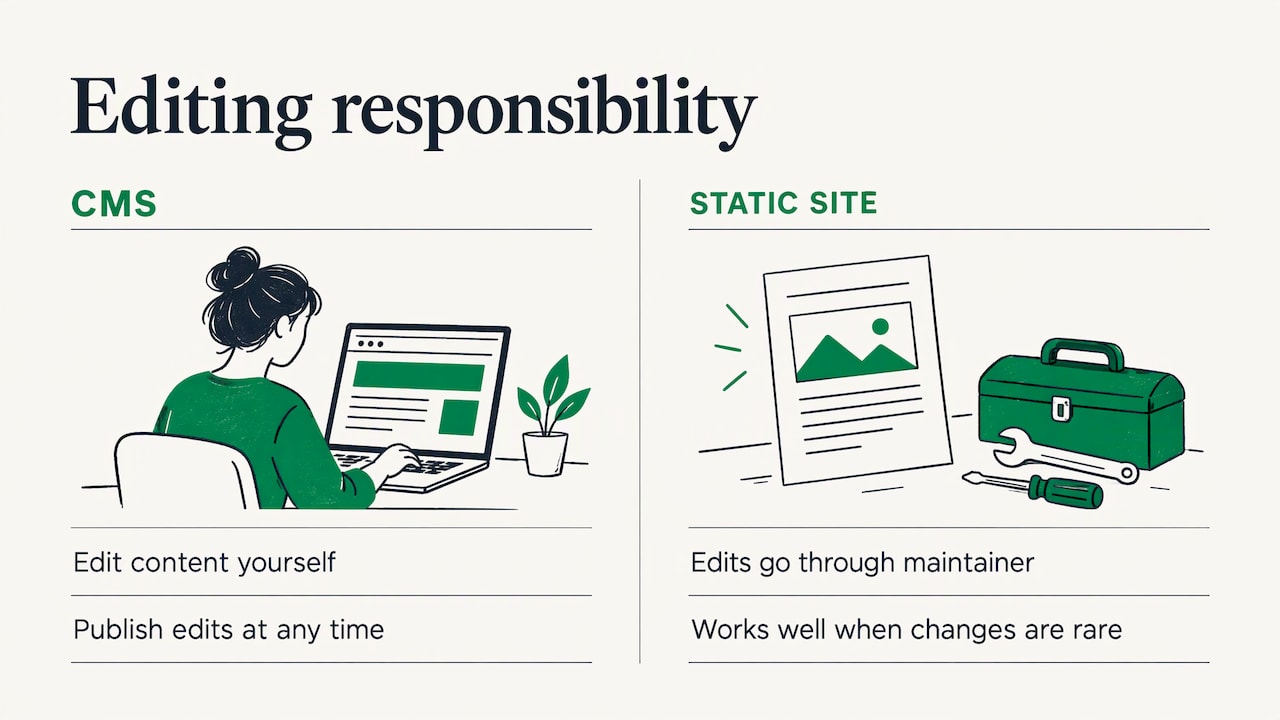
With a CMS, you can do those edits yourself at any time. With a static site, edits go through whoever maintains the site. That is perfectly fine when changes are rare and the person maintaining the site is quick to respond. It becomes frustrating if you have to wait for a developer every time a price moves.
Whichever you pick, plan what goes on the pages before you build. Our website content checklist covers the text, photos and details worth gathering first, and it makes either type of site faster to produce.
If you intend to publish regularly, think also about how your pages will read to AI search tools as well as to Google. A guide on checking your pages for AI search shows what to look at once your content is live.
Speed: it depends on the build, not the label
Static pages have a natural head start, because nothing has to be assembled before they are sent. A CMS has more work to do for each visit. In practice, though, a well-built CMS site on good hosting loads quickly, and a badly built static site stuffed with huge photos does not.
For a small business, the things that most affect speed are:
- Image size. Photos straight from a phone are often several megabytes. Resize and compress them before they go on the page.
- Theme and add-ons. On a CMS, every extra plugin is extra code to load.
- Hosting quality. Cheap, crowded hosting slows any site down.
- Third-party scripts. Chat widgets, trackers and booking tools each add weight.
Your customers are often on a phone, sometimes on a weak rural signal. That is why we build sites to be mobile-friendly and fast, whatever sits behind them.
Security and upkeep: the part most owners underestimate
A website is not a leaflet. Once it is live, it sits on the internet and needs looking after.
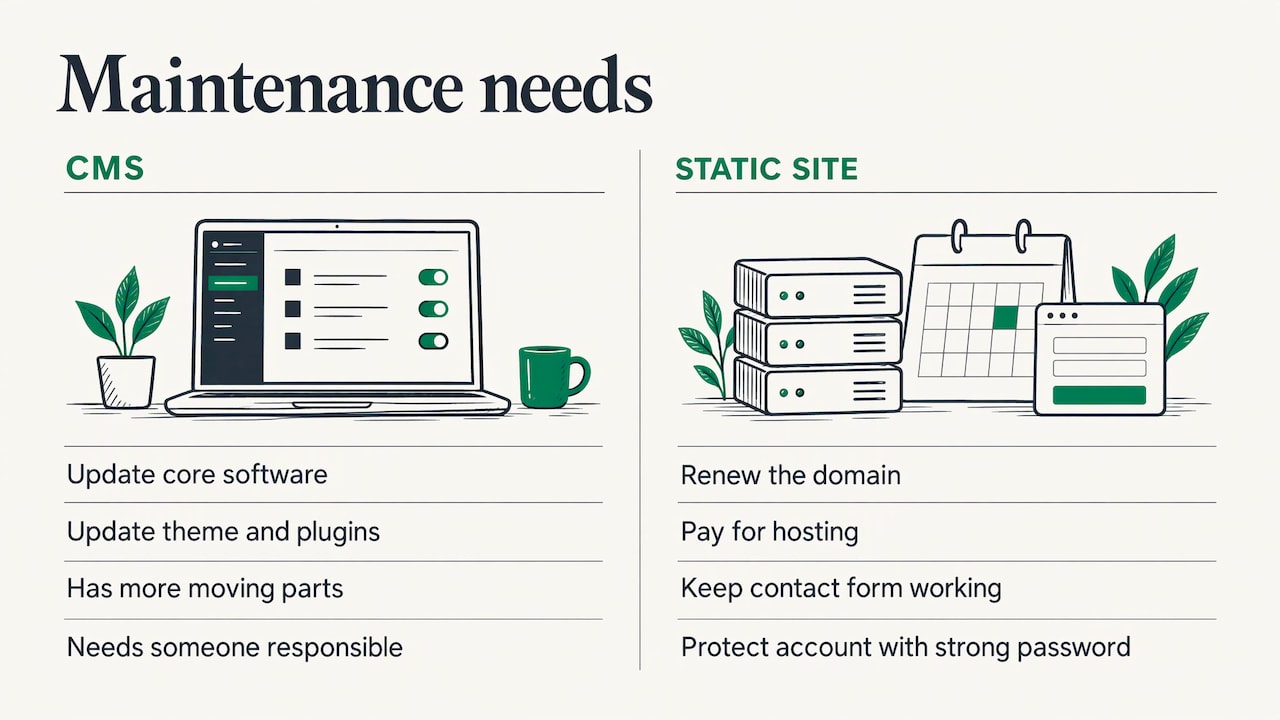
A CMS has more moving parts: the core software, the theme and any plugins. Each needs updating over time, and a site left untouched for a long period falls behind. A static site has fewer parts, so there is less to update, but it is not maintenance-free. It still needs a domain that is renewed, hosting that is paid for, a contact form that keeps working and an account that is protected with a strong password.
The honest conclusion is the same for both types: the risk comes from nobody being responsible. A site with a named person looking after it is in a far better position than a site that was built once and forgotten.
This is where the monthly care plan earns its place. Our plans cover hosting and technical website care, so the updating and keeping-things-running side is not something you have to remember. Our website maintenance checklist shows the five checks worth making regularly, and our page on what website care plans cover explains what is included each month.
Cost: build price and the running bill
Costs come in two parts: the build, and what you pay to keep the site online.
With a do-it-yourself CMS, the software can be free, but you still pay for hosting, a domain and often paid themes or plugins, and you pay in your own time. With a developer-built static site, hosting can be cheap, but changes cost developer time.
Our own pricing is simple and published. These are our fixed one-off build prices:
| Website | Price |
|---|---|
| Launch Website | €499 one-off |
| Business Website | €799 one-off |
| Growth Website | from €1,295 one-off |
Ongoing care is a monthly plan:
| Care plan | Price |
|---|---|
| Website Care | €29 per month |
| Business Growth Care | €49 per month |
| Website Care + SEO Growth | €99 per month |
You can see the full details on our pricing page. The point is that you know both numbers before you start: what it costs to build, and what it costs to keep running.
So which one should you choose?
Answer three questions.
- Who will edit the content, and how often? Rarely and by someone else: a small, stable site is enough. Often and by you: you need easy editing.
- Who is responsible for updates, hosting and security? If the answer is “me, when I remember”, you need a care plan or someone who takes it on.
- What is the goal of the site? If it is to win enquiries from local customers, what matters most is clear service pages, a visible phone number or enquiry form, and being found in local search. That matters far more than the technology underneath.
Some typical cases:
- A sole trader or tradesperson with a handful of pages, a gallery and a contact form: a compact, fast site with a care plan covers everything needed.
- A new business with a growing list of services: a site that can grow with extra pages, such as location pages, is worth planning from the start. Our guide to one-page or multi-page sites helps you decide how many pages you need.
- A professional services firm publishing advice and case studies: you will want content added regularly. See our approach to website design for professional services.
If your current site is the problem, because it is slow, outdated or hard to change, switching platforms is a manageable project when it is planned. Our platform migration plan walks through it, and our website redesign service handles the rebuild.
If you are weighing a drag-and-drop builder as a third option, our comparison of Wix or Squarespace against a professionally built website covers that decision.
What we think
We meet a lot of owners who have been told they must choose between a CMS and a static site, usually in a lot of jargon. Most of them just want a website that looks professional, loads quickly and brings in enquiries.
Our view is that the label matters far less than three practical things: that the site is clear and quick on a phone, that it is set up to be found locally, and that someone is looking after it every month. That is why we pair a fixed-price build with a monthly care plan, so hosting and technical care are never left to chance.
You also deal directly with the person building your site. There is no account manager passing messages along, and you get a fixed quotation up front. If you need to change something, you know who to call.
Start with what your business needs the website to do. We will take care of how it gets done.
niall
Get a site that is built and looked after for you
If you would rather not spend your evenings comparing platforms, we build professional websites for new and small Irish businesses, with the domain, business email, hosting and technical care handled alongside. The Launch Website starts at €499 one-off, and Website Care is €29 per month. We can also set up your Google Business Profile and local SEO foundations so nearby customers find you.

See the packages on our pricing page, or look at how a project runs on our how it works page.
FAQ
Is WordPress a static website?
No. WordPress stores content in a database and generates each page dynamically when someone visits. Visitors see an ordinary page, but behind the scenes it is assembled on request. Static versions of WordPress sites exist, but they are a special set-up rather than the default.
Is a CMS better than a static website for a small business?
Neither is better in every case. A CMS suits a business that adds or changes content often and wants to edit it directly. A static site suits a small, stable site that needs little change. What matters most is that the site is fast, clear and looked after.
Is a static website more secure?
A static site has fewer parts that need updating, so there is less to go out of date. It still depends on safe hosting, a protected account and working forms, so it still needs someone responsible for it. A monthly care plan gives you that.
Do I need to know how to code to run a website?
No. You need to know what you want your site to say and do, and to have someone who handles the technical side. We look after the build, hosting and technical care, and you deal directly with the person building your site.